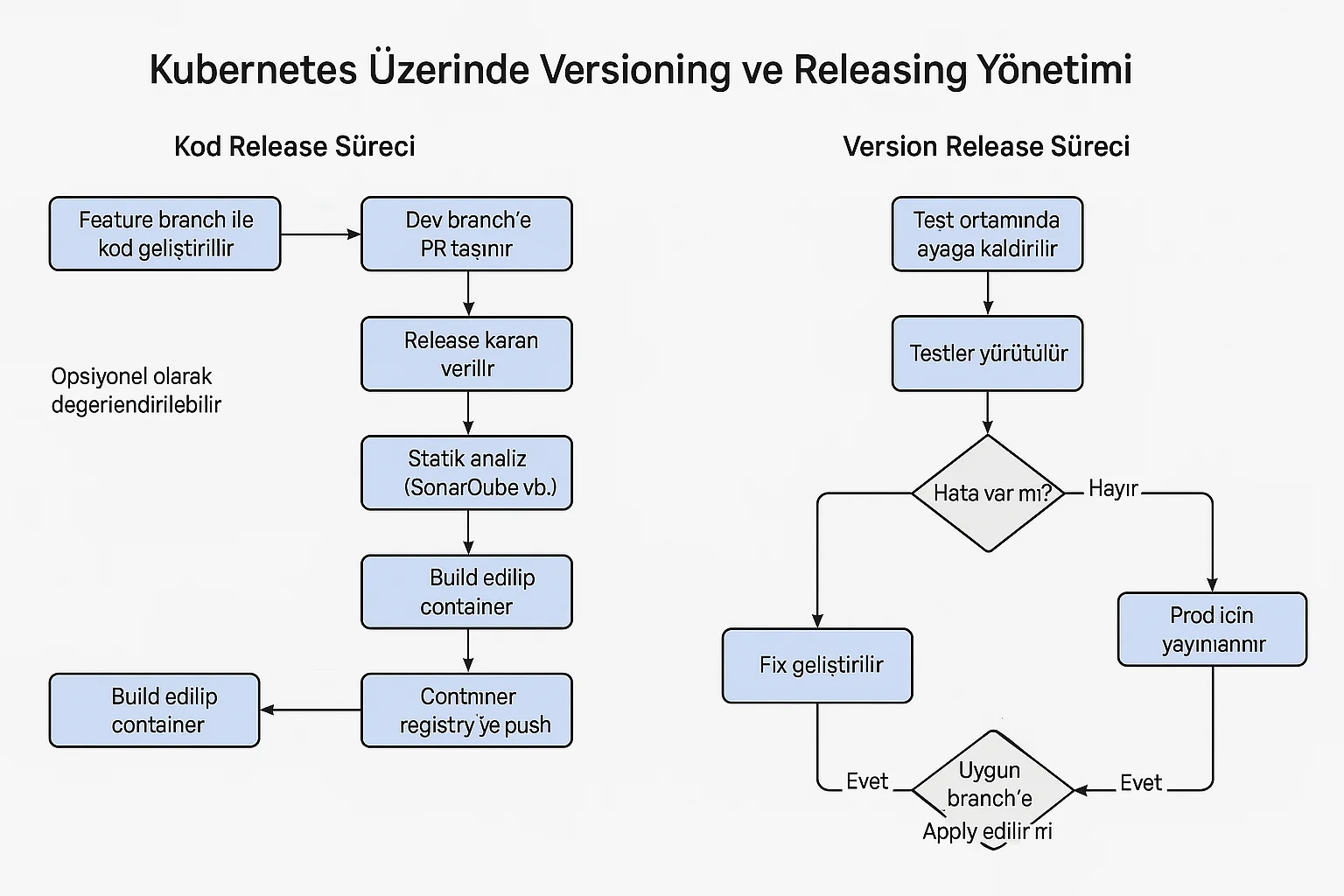
Versioning and Releasing Management on Kubernetes
A simple roadmap for small or medium-sized, uncrowded teams
This article; It offers a simple approach to code development, versioning, container build processes and release management on Kubernetes.
The steps here must be customized according to team size, culture, technical environment, product or regulations; should be viewed as a practical beginner’s guide, not strict rules.
1. General Principles
- Git should always be the single source of truth (Single Source of Truth).
- Code, Kubernetes YAML files, kustomize templates and configurations are versioned on Git.
- Container tags are managed with the SemVer + build number / commit hash model.
- Automation is kept high in Dev and Test/Staging environments, while there is always a manual control layer in the Prod environment.
- Avoiding complex tool sets and keeping processes simple in small teams increases sustainability.
2. Phase 1 – Code Release Process
2.1. Branching Model
- main: Only stable code going to prod.
- dev: Integrated code to test.
- feature/*: New feature development branches.
- hotfix/*: Quick fixes for prod environment errors.
2.2. Code Development and Release Flow
- Feature branch is created.
- The code is developed and progress is made with small and meaningful commit messages.
- Static analysis (SonarQube etc.) – can be considered optional.
- Unit tests are run.
- README is updated:
- How to run the service
- Upgrade steps
- Required environment variables and configuration information
- Container is built and versioning is done. For example:
1.3.0-451.3.0-a82d9f1b
- The built image is pushed to the registry.
- Pull Request is created for
feature/*→devand merged after code review. - When the release decision is made,
dev→mainis merged and a tag is created:v1.3.0
3. Phase 2 – Version Release Process (Kubernetes)
3.1. Deploy in Testing / Staging Environment
- The image tag is updated in the Test/Staging overlay or manifest file.
- Pipeline is triggered and deployed to Kubernetes.
- Security, performance and functional tests are applied.
- If necessary, alpha/beta user tests are carried out.
3.2. Fix Flow in Case of Error
flowchart TD
    A[Bug tespit] --> B[Issue aç]
    B --> C{Kritiklik?}
    C -->|Kritik| D[hotfix branch]
    C -->|Normal| E[feature veya mevcut branch]
    D --> F[Fix geliştir]
    E --> F
    F --> G[CI: test + build]
    G --> H[Container push]
    H --> I[Test/Staging deploy]
    I --> J[Regression test]
    J --> K{Çözüldü mü?}
    K -->|Evet| L[Prod release adayı]
    K -->|Hayır| B
The fixed version can also be applied to other relevant feature branches (for example, with cherry-pick) if necessary.
3.3. Clean Installation and Upgrade Tests
- The new version is first installed and tested from scratch on a clean namespace.
- Then the upgrade scenario from the previous stable version is run; data migrations and backward compatibility are checked.
3.4. Prod Release
- The image tag is updated in the product manifests.
- Automatic deployment does not work in the Prod environment; There is a manual “review & approve” layer.
- DevOps / Platform Engineer checks the diff and configuration changes.
- After approval, deployment is done.
- Necessary migrations are applied, health check and smoke tests are run.
- Release is completed and monitored.
4. Configuration Management and Kubernetes YAML Structure
In this model, the customized + pure YAML approach is mostly preferred instead of Helm.
Recommended directory structure:
k8s/
  service-name/
    base/
    overlays/
      dev/
      test/
      prod/
- Common definitions are kept under
base/. - Environment-based differences are managed in
overlays/*folders. - In staging environments, processes can be fully automated.
- Nothing in the prod environment is implemented completely automatically; There is definitely a manual review layer.
5. Team Roles and Responsibilities
Product Owner
- Determines use-cases and stories.
- Creates sprint plans and release calendar.
- Determines technical scope and priorities together with the Architect.
Tech Lead / Architect* Determines technical design and architecture.
- Defines service boundaries, integration models and data flow.
- It outlines how to handle technical issues.
- Participates in code review processes when necessary.
- Creates versioning, release and technical quality standards.
DevOps / Platform Engineer
- Manages Kubernetes environments.
- Manages YAML/kustomize configurations and environment versioning.
- Establishes and maintains CI/CD pipelines.
- Manages security, secret management, monitoring and logging infrastructures.
- Executes the manual review & apply process in the production environment.
These roles can be combined or separated based on team capabilities. In small teams, some roles may be held by the same person; The important thing is that responsibilities are clear.
6. General Summary
- The code is developed in feature branches and PRed to the
devbranch. - Unit test + build + optional static analysis is run.
- Container is built; It is sent to the registry with SemVer + build/commit tag.
- Deployment is made automatically to staging environments and manually to production environments.
- Kustomize/pure YAML is versioned via Git and managed on an environment basis.
- The release process is always verified by clean installation + upgrade tests.
- The entire process is designed to be simple but flexible according to the team culture and environment.
Appendix A – Sample CI/CD Pipeline Template
The example below is a generic template for a Jenkins/Jenkins-X like environment.
- Build + test
- (Optional) static analysis
- Docker build & push
- Dev → Test auto
- Manual approval for prod
pipeline {
    agent any

    environment {
        REGISTRY      = 'registry.example.com'
        APP_NAME      = 'invoice-service'
        VERSION       = '1.3.0'                // Manuel/otomatik set edilebilir
        GIT_COMMIT_ID = "${env.GIT_COMMIT}"    // Jenkins otomatik doldurur
        IMAGE_TAG     = "${VERSION}-${GIT_COMMIT_ID.take(8)}"
        IMAGE         = "${REGISTRY}/${APP_NAME}:${IMAGE_TAG}"
        K8S_DIR       = 'k8s/invoice-service'
        RUN_SONAR     = 'false'               // İhtiyaca göre true/false
    }

    stages {
        stage('Checkout') {
            steps {
                checkout scm
            }
        }

        stage('Build & Unit Tests') {
            steps {
                sh """
                  ./gradlew clean test       // kendi build komutunla değiştir
                """
            }
        }

        stage('Static Analysis (optional)') {
            when {
                expression { env.RUN_SONAR == 'true' }
            }
            steps {
                sh """
                  ./gradlew sonarqube       // örnek Sonar taraması
                """
            }
        }

        stage('Docker Build & Push') {
            steps {
                sh """
                  docker build -t ${IMAGE} .
                  docker push ${IMAGE}
                """
            }
        }

        stage('Deploy to Dev') {
            steps {
                sh """
                  cd ${K8S_DIR}/overlays/dev
                  kustomize edit set image ${REGISTRY}/${APP_NAME}=${IMAGE}
                  kustomize build . | kubectl apply -f -
                """
            }
        }

        stage('Deploy to Test') {
            steps {
                sh """
                  cd ${K8S_DIR}/overlays/test
                  kustomize edit set image ${REGISTRY}/${APP_NAME}=${IMAGE}
                  kustomize build . | kubectl apply -f -
                """
            }
        }

        stage('Manual Approval for Prod') {
            steps {
                script {
                    timeout(time: 1, unit: 'HOURS') {
                        input message: "Prod ortamına ${IMAGE_TAG} versiyonunu deploy etmek istiyor musun?"
                    }
                }
            }
        }

        stage('Deploy to Prod') {
            steps {
                sh """
                  cd ${K8S_DIR}/overlays/prod
                  kustomize edit set image ${REGISTRY}/${APP_NAME}=${IMAGE}
                  kustomize build . | kubectl apply -f -
                """
            }
        }
    }
}
Use your own build commands instead of
./gradlew,kubectl kustomizeinstead ofkustomize, etc. You can use commands.
Appendix B – Sample Customized Template Set
Syntax Structure
k8s/
  invoice-service/
    base/
      deployment.yaml
      service.yaml
      kustomization.yaml
    overlays/
      dev/
        kustomization.yaml
        configmap-dev.yaml
      test/
        kustomization.yaml
        configmap-test.yaml
      prod/
        kustomization.yaml
        configmap-prod.yaml
        hpa-prod.yaml
1. base/kustomization.yaml
apiVersion: kustomize.config.k8s.io/v1beta1
kind: Kustomization

resources:
  - deployment.yaml
  - service.yaml
2. base/deployment.yaml
apiVersion: apps/v1
kind: Deployment
metadata:
  name: invoice-service
  labels:
    app: invoice-service
spec:
  replicas: 2
  selector:
    matchLabels:
      app: invoice-service
  template:
    metadata:
      labels:
        app: invoice-service
    spec:
      containers:
        - name: invoice-service
          image: registry.example.com/invoice-service:latest   # overlay ile override edilecek
          ports:
            - containerPort: 8080
          env:
            - name: LOG_LEVEL
              value: "Info"
          readinessProbe:
            httpGet:
              path: /health
              port: 8080
            initialDelaySeconds: 5
            periodSeconds: 10
          livenessProbe:
            httpGet:
              path: /health
              port: 8080
            initialDelaySeconds: 15
            periodSeconds: 20
3. base/service.yaml
apiVersion: v1
kind: Service
metadata:
  name: invoice-service
  labels:
    app: invoice-service
spec:
  selector:
    app: invoice-service
  ports:
    - port: 80
      targetPort: 8080
      protocol: TCP
      name: http
  type: ClusterIP
4. overlays/dev/kustomization.yaml
apiVersion: kustomize.config.k8s.io/v1beta1
kind: Kustomization

resources:
  - ../../base

images:
  - name: registry.example.com/invoice-service
    newTag: dev-latest   # Pipeline burada gerçek tag ile override edecek

configMapGenerator:
  - name: invoice-service-config-dev
    behavior: merge
    literals:
      - LOG_LEVEL=Debug
      - FEATURE_FLAG_EXPERIMENTAL=true
5. overlays/dev/configmap-dev.yaml (optional)
apiVersion: v1
kind: ConfigMap
metadata:
  name: invoice-service-extra-dev
data:
  SAMPLE_KEY: "dev-only-value"
6. overlays/test/kustomization.yaml
apiVersion: kustomize.config.k8s.io/v1beta1
kind: Kustomization

resources:
  - ../../base

images:
  - name: registry.example.com/invoice-service
    newTag: test-latest

configMapGenerator:
  - name: invoice-service-config-test
    behavior: merge
    literals:
      - LOG_LEVEL=Info
      - FEATURE_FLAG_EXPERIMENTAL=false
7. overlays/prod/kustomization.yaml
apiVersion: kustomize.config.k8s.io/v1beta1
kind: Kustomization

resources:
  - ../../base
  - hpa-prod.yaml

images:
  - name: registry.example.com/invoice-service
    newTag: 1.3.0-PLACEHOLDER   # Pipeline burayı gerçek tag ile değiştirecek

configMapGenerator:
  - name: invoice-service-config-prod
    behavior: merge
    literals:
      - LOG_LEVEL=Warning
      - FEATURE_FLAG_EXPERIMENTAL=false

patchesStrategicMerge:
  # Gerekirse prod'a özel patch dosyaları eklenebilir
  # - deployment-prod-patch.yaml
8. overlays/prod/configmap-prod.yaml (optional)
apiVersion: v1
kind: ConfigMap
metadata:
  name: invoice-service-extra-prod
data:
  SAMPLE_KEY: "prod-only-value"
9. overlays/prod/hpa-prod.yaml
apiVersion: autoscaling/v2
kind: HorizontalPodAutoscaler
metadata:
  name: invoice-service-hpa
spec:
  scaleTargetRef:
    apiVersion: apps/v1
    kind: Deployment
    name: invoice-service
  minReplicas: 2
  maxReplicas: 10
  metrics:
    - type: Resource
      resource:
        name: cpu
        target:
          type: Utilization
          averageUtilization: 70
Appendix C – Flow Diagrams (Mermaid)
C.1. End-to-End Version & Release Flow
flowchart TB
    A[Developer<br/>feature branch] --> B[CI: Build & Unit Test]
    B --> C{Static Analysis?}
    C -->|Opsiyonel| D[Sonar / statik analiz]
    C -->|Atlanır| E[Docker Build]
    D --> E[Docker Build]
    E --> F[Push to Registry<br/>image: version+commit]
    F --> G[Deploy to Dev<br/>kustomize dev]
    G --> H[Dev Testleri]
    H --> I[Deploy to Test/Staging<br/>kustomize test]
    I --> J[Test & QA & Alpha/Beta]
    J --> K{Release OK?}
    K -->|Hayır| A
    K -->|Evet| L[Manual Approval for Prod]
    L --> M[Deploy to Prod<br/>kustomize prod]
    M --> N[Monitoring & Smoke Tests]
C.2. Config / YAML Promotion Flow
flowchart TB
    A[base/ manifests] --> B[overlays/dev]
    A --> C[overlays/test]
    A --> D[overlays/prod]

    B --> E[Dev Deploy<br/>Otomatik]
    C --> F[Test/Staging Deploy<br/>Otomatik]
    D --> G[Prod Deploy<br/>Manuel onay ile]

    E --> H[Dev'te hızlı feedback]
    F --> I[Test/Staging'te tam senaryo testleri]
    G --> J[Prod'da kontrollü release]